Adaptive
  • Home
  • CAPA Software
    • Choose the CAPA Manager workflow closest to the problem you need to control.
    • Core CAPA workflows
      • CAPA softwareCloud CAPA management for investigation, corrective action, verification and closure.
      • Corrective actionManage corrective actions, NCRs, preventive actions and recurring quality issues.
      • 8D SoftwareGuide teams through containment, root cause analysis, RCCA and 8D reporting.
      • Audit actionTrack findings, assign owners and close audit corrective actions with evidence.
    • Specialist solutions
      • FRACASCapture failures, analyze causes and prevent recurrence in one controlled workflow.
      • EnvironmentalRecord environmental events, actions, evidence, approvals and follow-up tasks.
      • Health and safetyHandle incidents, hazards, actions and closure with traceable ownership.
      • Product Investigation SoftwareManage product investigations, PIR records, evidence and approvals.
      • Enterprise CAPABespoke CAPA Manager application services for private or managed server deployments.
    • Learn
      • What is CAPA software?A practical guide to CAPA systems, workflows and quality management terms.
      • CAPA Manager featuresExplore CAPA Manager 3 features for workflows, dashboards, reports, approvals and integrations.
  • Industries
    • Find pages relating to your industry.
    • Standards and sectors
      • PharmaSupport GMP-aligned deviation, CAPA and investigation workflows.
      • MedicalSupport ISO 13485 and FDA-regulated quality system requirements.
      • AerospaceSupport AS9100 quality teams with NCRs, supplier actions and 8D investigations.
      • AutomotiveSupport IATF 16949 teams with 8D, RCCA and action tracking.
      • Other industriesOperational issue management for energy, food, chemical and service teams.
  • Pricing
  • Other Products
    • Useful services, templates and tools from our quality improvement work.
    • Services
      • Training servicesPractical training and improvement support for quality and operations teams.
      • Application developmentCustom software engineering for quality and operational workflows.
    • Templates and tools
      • 360 Degree feedbackA simple template for structured management and team feedback.
      • NPI Stage Gate templateA practical APQP and new product introduction gate review tool.
      • BOS ChartA business operating system chart template for performance tracking.
      • Gauge R&R MSAMeasurement system analysis support for repeatability and reproducibility.
      • Free quality toolsTemplates, calculators and practical resources for improvement teams.
  • More
    • Help, reviews, documents and ways to get in touch.
    • Get started
      • Contact usTalk with our team about CAPA Manager, pricing or implementation questions.
      • Free CAPA accountCreate a trial account and start using CAPA Manager.
      • User guideRead the CAPA Manager user guide and product instructions.
      • FAQsAnswers to common CAPA Manager and trial account questions.
    • Resources
      • CAPA Manager newsProduct updates, release notes and company news.
      • MediaShort product videos and CAPA Manager walkthroughs.
      • ReviewsCustomer ratings and independent feedback about CAPA Manager.
      • Knowledge baseArticles about CAPA, RCA, 8D, quality systems and improvement.
    • Documents
      • Terms of serviceService terms and usage conditions.
      • Subscriber AgreementSubscription agreement for CAPA Manager customers.
      • Privacy statementHow we handle personal data and privacy.
      • Security profileSecurity, hosting and data protection information.
Log in from: United States
Home
CAPA Software

Core CAPA workflows

  • CAPA software
  • Corrective action
  • 8D Software
  • Audit action

Specialist solutions

  • FRACAS
  • Environmental
  • Health and safety
  • Product Investigation Software
  • Enterprise CAPA

Learn

  • What is CAPA software?
  • CAPA Manager features
Industries

Standards and sectors

  • Pharma
  • Medical
  • Aerospace
  • Automotive
  • Other industries
Pricing
Other Products

Services

  • Training services
  • Application development

Templates and tools

  • 360 Degree feedback
  • NPI Stage Gate template
  • BOS Chart
  • Gauge R&R MSA
  • Free quality tools
More

Get started

  • Contact us
  • Free CAPA account
  • User guide
  • FAQs

Resources

  • CAPA Manager news
  • Media
  • Reviews
  • Knowledge base

Documents

  • Terms of service
  • Subscriber Agreement
  • Privacy statement
  • Security profile
Log in from: United StatesLog in from United States

360 degree feedback template download

360 Degree Feedback Pro from Adaptive Business Management Systems is an easy-to-use personal performance analysis tool. This tool provides individuals with insight into other people’s perceptions of their leadership abilities and behavior.

Use this 360-degree appraisal form to gather feedback from the people you work with. The sample questions relate to a range of core competencies and skills. You can customize the template to suit your own particular needs if required.

Identify leadership strengths and development needs with 360-degree feedback

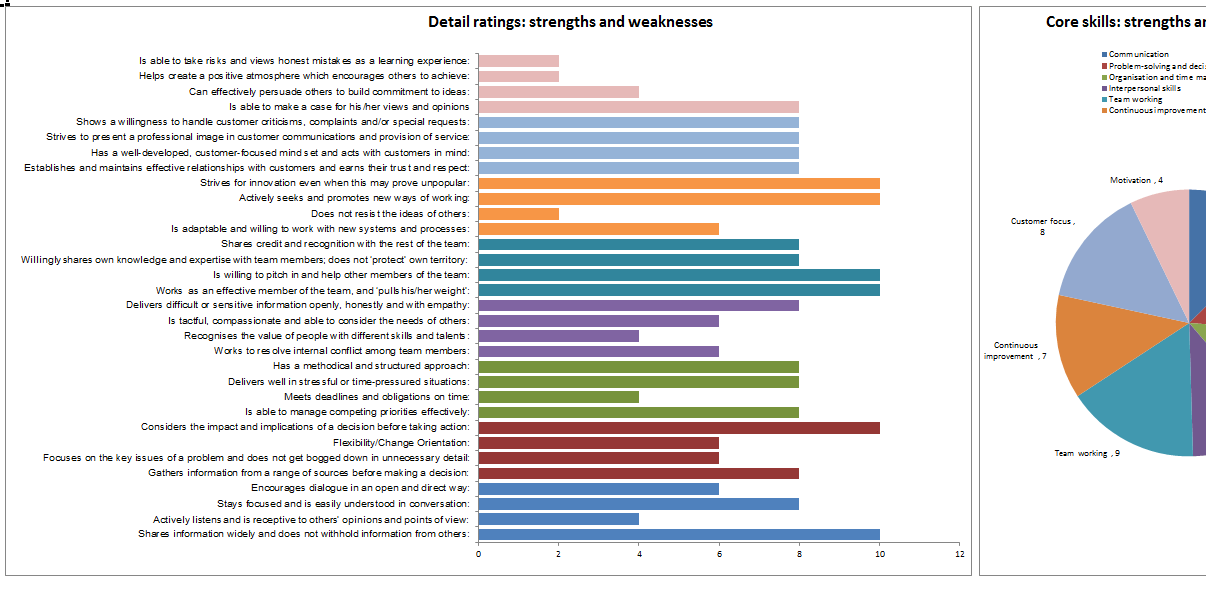
This tool produces a summary report from the feedback received. Potential areas for development are clearly identified.

360 Degree Feedback Pro is quick and easy to use, making it ideal for assisting managers and team leaders with their personal development.

What's included?

Your downloaded ZIP file contains the following:

  • 360 Degree Feedback Pro Excel template (Microsoft Office 2003 or later).
  • Worked example.
  • User guide.

Download it now and get started for just $9.95 USD.

360 degree template
360 degree feedback
Buy now

Problems or questions? Just email us: templates@adaptivebms.com

How to use this template effectively

Start by reviewing the worked example before changing the workbook. This helps you understand the structure, formulas, inputs, and expected outputs before applying the template to your own project. Keep an original copy safe, then create a working copy for each new assignment.

When using the template with a team, agree the purpose of the analysis, the review dates, and who owns updates. Templates work best when they are used as part of a clear improvement process rather than as a one-off spreadsheet exercise. Record assumptions, keep supporting evidence, and make sure the final report is easy for another person to follow later.

Support and customization

The template can be adapted to match your terminology, reporting format, and internal review process. If you have questions about the workbook or need help choosing the right tool for your project, contact us and we will point you in the right direction.

Before you share the results

Check that the inputs are complete, the assumptions are clear, and the workbook has been reviewed by someone familiar with the process. If the file is being used for management review, add a short explanation of what changed, what decision is needed, and what action will follow. This makes the template easier to use as part of a controlled improvement record.

inLinkedIn ►YouTube vVimeo XX fFacebook
Contact us Privacy statement Security profile Media Terms of service Free corrective action software About us

Copyright © 2011-2026 Adaptive Business Management Systems Ltd. All rights reserved.

Registered number: 07617267. Registered office: Adaptive House, Fern Square, Weymouth, Dorset DT3 4NZ, United Kingdom.

Adaptive Business Management Systems Ltd. is a company registered in England and Wales.

Also known as: Adaptive, ABMS, Adaptive BMS, and adaptivebms.com