Record and assess
Describe the issue, affected product or process, immediate correction and available evidence while the facts are current.
Corrective action management for medical device quality teams
Manage medical device quality investigations, corrective and preventive actions, approvals and effectiveness checks in one structured system. CAPA Manager helps quality teams maintain clear ownership, investigation history and traceable follow up.
Free for 2 users and up to 5 new investigations per month. No credit card. No sales call. No fixed trial expiration.

A proportionate quality response
Manufacturing nonconformances, inspection failures, supplier defects, audit findings and recurring product or process problems need a response that reflects their significance. Quality problems identified through complaint investigations may also lead to further corrective action where the organization decides it is appropriate.
Not every nonconformance automatically requires a full CAPA. The response should follow the organization's documented procedures and consider risk, significance, recurrence and applicable requirements.
Issue → Assessment → Investigation → Root Cause → Corrective Action → Verification → Effectiveness → Closure
Record and assess
Describe the issue, affected product or process, immediate correction and available evidence while the facts are current.
Investigate the cause
Assign ownership and document potential causes, contributing factors, evidence and the team's conclusions.
Manage the action
Set responsible owners and target dates, then retain implementation records with the original problem.
Verify and close
Review completion and effectiveness before recording the organization's controlled closure decision.
CAPA Manager supports documented corrective action processes within an ISO 13485 quality management system. Teams can record identified problems, assess the need for corrective action, assign investigation ownership, document root cause analysis, manage action plans and retain verification, effectiveness review and closure history.
Software alone does not establish ISO 13485 compliance. Customers remain responsible for their own quality management systems, procedures, applicable software validation and regulatory conformity.
Structured investigation
Correcting an immediate problem restores control. Root cause investigation examines why it happened and what should change to reduce recurrence. CAPA Manager helps teams document the investigation and evidence without claiming to determine the correct cause for them.
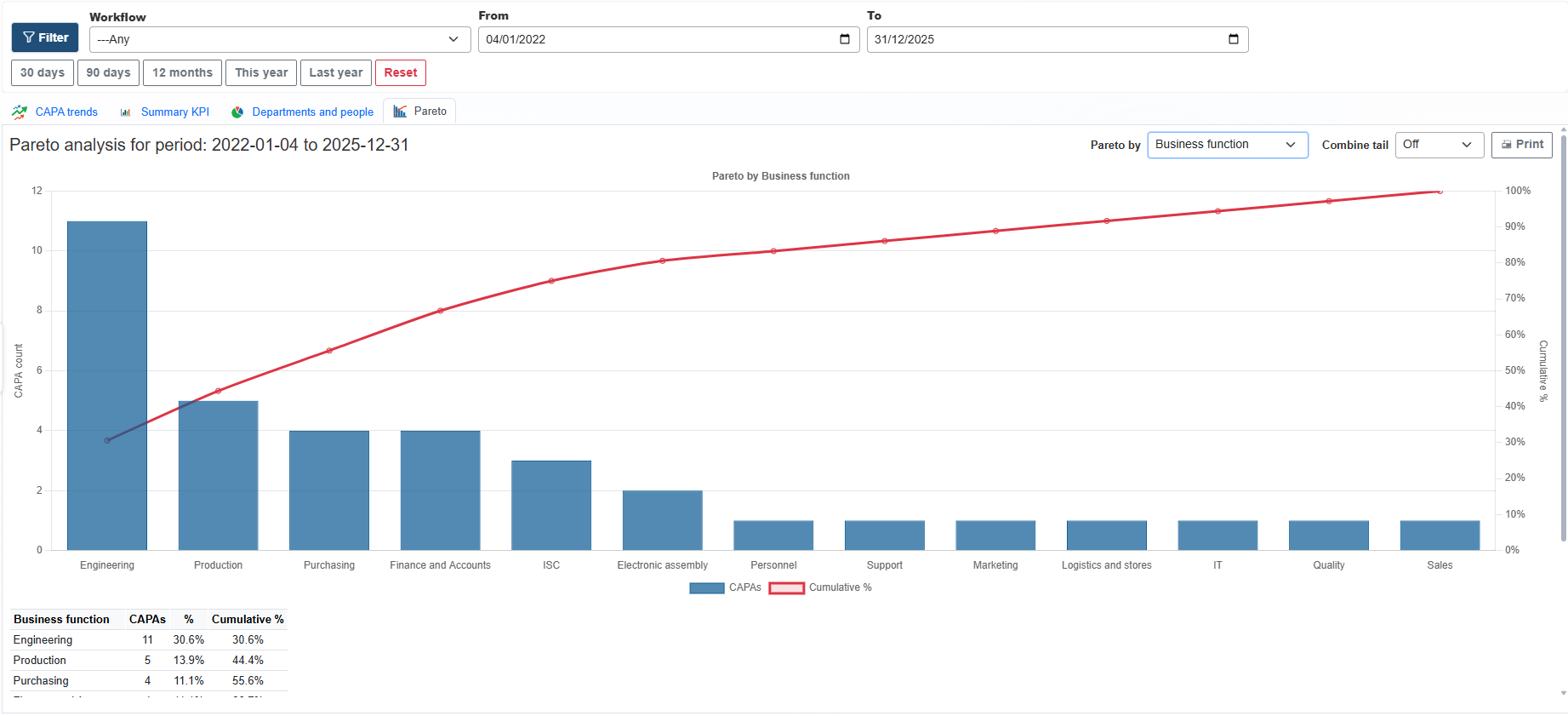
Use 5 Whys, Ishikawa or 6M analysis, 8D investigation, Pareto analysis and structured CAPA workflows where they fit the organization's approved process.
Explore the specialist 8D investigation software page for the full 8D workflow.
Completing an action is different from establishing its effectiveness. CAPA Manager helps quality teams retain the connection between the original problem, its investigation, corrective action and subsequent effectiveness review.
If the evidence does not demonstrate the intended result, the organization can decide whether further investigation, revised action or continued monitoring is needed.
Maintain a clear working history from the original issue through investigation, action, review and closure. This makes ownership and decisions easier to understand during internal review, management review and external audits.
Original issue
Keep the nonconformance, source, classification and affected product or process visible.
Investigation findings
Connect evidence, potential causes, conclusions and the reasoning behind the selected response.
Actions and approvals
Retain owners, target dates, progress, review decisions and closure history in the same process.
Premium evidence and reports
Attachments, supporting evidence uploads, PDF reports and data exports require an eligible Premium plan.
Where review or closure approval is configured, CAPA Manager retains the named decision with the investigation history. Customers remain responsible for determining whether their procedures and technical controls meet any applicable electronic record or signature requirements.
Use a proportionate workflow for the quality problem in front of the team without presenting CAPA Manager as a complete medical device eQMS or regulatory reporting platform.
Manufacturing defect
An inspection identifies recurring defects. The quality team records the issue, investigates causes, assigns corrective actions and checks effectiveness.
Supplier nonconformance
A supplier related defect requires investigation and internal follow up. CAPA Manager records the response, ownership and action history.
Audit finding
A quality system audit identifies a process weakness. Responsible owners investigate and manage corrective action through documented review.
Complaint related investigation
A complaint identifies a possible quality problem. The organization may initiate a CAPA investigation where its procedures indicate that further action is appropriate.
For supplier specific workflows, see supplier corrective action and SCAR software.
Spreadsheets remain useful for many quality tasks. They become harder to manage when investigations involve several owners, changing dates, approvals, evidence and effectiveness follow up.
CAPA Manager provides a shared corrective action record when multiple file versions, email only decisions and manual status reporting make progress difficult to see.
Quality managers need a practical view of open investigations, overdue actions, ownership, progress, closure status and effectiveness follow up.
Owners and due dates
Assign responsibilities and target dates so the next action remains visible.
Investigation progress
See the current workflow status and the work still required before review.
Overdue actions
Keep delayed corrective actions visible to responsible users and quality managers.
Effectiveness follow up
Track whether an effectiveness review is planned, completed and documented.
Dashboards and trends
Review open, closed and overdue CAPAs, recurring causes and closure performance.
Configurable workflows
Use established workflows with configurable fields and classifications. Premium accounts can also use customer designed workflows that reflect the organization's process.
Review the CAPA Manager feature reference or compare Free and Premium pricing.
A dedicated CAPA system can provide structure without requiring an organization to introduce a broad eQMS at the same time. Begin with established workflows, then add users or Premium capabilities as requirements grow.
Straightforward setup
Start with established investigation and corrective action workflows rather than building a process from scratch.
Cloud access
Give authorized team members access to the same current CAPA records from supported web browsers.
Traceable records
Keep ownership, dates, investigation findings, review decisions and closure history connected.
Flexible account sizes
Start with two free users, then review Premium options when more users or additional capabilities are needed.
Start with 2 users and up to 5 new investigations per month. No credit card, no sales call and no fixed trial expiration. Premium accounts have no monthly CAPA or investigation limit.
What is medical device CAPA software?
Medical device CAPA software helps quality teams document problems, investigate causes, assign corrective actions, review implementation and record effectiveness and closure history.
How does CAPA Manager support ISO 13485 corrective action processes?
CAPA Manager supports structured records for identified problems, investigation ownership, root cause analysis, action plans, implementation, effectiveness review and closure. The organization remains responsible for its QMS and conformity decisions.
Can CAPA Manager manage medical device nonconformances?
Yes. Teams can record nonconformances and manage the related assessment, investigation and corrective action where their approved procedures require it.
Can CAPA Manager help with investigations arising from customer complaints?
Yes. A quality team can record and manage an investigation arising from a complaint. CAPA Manager is not presented as a regulatory complaint reporting, vigilance or recall platform.
Does every medical device nonconformance require a CAPA?
No. The response should follow the organization's procedures and consider factors such as risk, significance, recurrence and applicable requirements.
How can corrective action effectiveness be checked?
Define the intended result, set an appropriate follow up point, review objective evidence and recurrence information, then record whether the corrective action achieved that result.
Can CAPA Manager support supplier corrective actions?
Yes. Internal teams can record supplier issues, ownership, investigation responses, assigned actions, dates, follow up and effectiveness results.
Can medical device quality teams start with a free account?
Yes. CAPA Manager offers a free account for two users and up to 5 new investigations per month, with no credit card and no fixed trial expiration. Premium accounts have no monthly CAPA or investigation limit. Free accounts remain subject to the applicable service terms and inactivity policy.
Professional CAPA software with a free two user starting point and up to 5 new investigations per month. Premium accounts have no monthly CAPA or investigation limit.