Adaptive
  • Home
  • CAPA Software
    • Choose the CAPA Manager workflow closest to the problem you need to control.
    • Core CAPA workflows
      • CAPA softwareCloud CAPA management for investigation, corrective action, verification and closure.
      • Corrective actionManage corrective actions, NCRs, preventive actions and recurring quality issues.
      • 8D SoftwareGuide teams through containment, root cause analysis, RCCA and 8D reporting.
      • Audit actionTrack findings, assign owners and close audit corrective actions with evidence.
    • Specialist solutions
      • FRACASCapture failures, analyze causes and prevent recurrence in one controlled workflow.
      • EnvironmentalRecord environmental events, actions, evidence, approvals and follow-up tasks.
      • Health and safetyHandle incidents, hazards, actions and closure with traceable ownership.
      • Product Investigation SoftwareManage product investigations, PIR records, evidence and approvals.
      • Enterprise CAPABespoke CAPA Manager application services for private or managed server deployments.
    • Learn
      • What is CAPA software?A practical guide to CAPA systems, workflows and quality management terms.
      • CAPA Manager featuresExplore CAPA Manager 3 features for workflows, dashboards, reports, approvals and integrations.
  • Industries
    • Find pages relating to your industry.
    • Standards and sectors
      • PharmaSupport GMP-aligned deviation, CAPA and investigation workflows.
      • MedicalSupport ISO 13485 and FDA-regulated quality system requirements.
      • AerospaceSupport AS9100 quality teams with NCRs, supplier actions and 8D investigations.
      • AutomotiveSupport IATF 16949 teams with 8D, RCCA and action tracking.
      • Other industriesOperational issue management for energy, food, chemical and service teams.
  • Pricing
  • Other Products
    • Useful services, templates and tools from our quality improvement work.
    • Services
      • Training servicesPractical training and improvement support for quality and operations teams.
      • Application developmentCustom software engineering for quality and operational workflows.
    • Templates and tools
      • 360 Degree feedbackA simple template for structured management and team feedback.
      • NPI Stage Gate templateA practical APQP and new product introduction gate review tool.
      • BOS ChartA business operating system chart template for performance tracking.
      • Gauge R&R MSAMeasurement system analysis support for repeatability and reproducibility.
      • Free quality toolsTemplates, calculators and practical resources for improvement teams.
  • More
    • Help, reviews, documents and ways to get in touch.
    • Get started
      • Contact usTalk with our team about CAPA Manager, pricing or implementation questions.
      • Free CAPA accountCreate a trial account and start using CAPA Manager.
      • User guideRead the CAPA Manager user guide and product instructions.
      • FAQsAnswers to common CAPA Manager and trial account questions.
    • Resources
      • CAPA Manager newsProduct updates, release notes and company news.
      • MediaShort product videos and CAPA Manager walkthroughs.
      • ReviewsCustomer ratings and independent feedback about CAPA Manager.
      • Knowledge baseArticles about CAPA, RCA, 8D, quality systems and improvement.
    • Documents
      • Terms of serviceService terms and usage conditions.
      • Subscriber AgreementSubscription agreement for CAPA Manager customers.
      • Privacy statementHow we handle personal data and privacy.
      • Security profileSecurity, hosting and data protection information.
Home
CAPA Software

Core CAPA workflows

  • CAPA software
  • Corrective action
  • 8D Software
  • Audit action

Specialist solutions

  • FRACAS
  • Environmental
  • Health and safety
  • Product Investigation Software
  • Enterprise CAPA

Learn

  • What is CAPA software?
  • CAPA Manager features
Industries

Standards and sectors

  • Pharma
  • Medical
  • Aerospace
  • Automotive
  • Other industries
Pricing
Other Products

Services

  • Training services
  • Application development

Templates and tools

  • 360 Degree feedback
  • NPI Stage Gate template
  • BOS Chart
  • Gauge R&R MSA
  • Free quality tools
More

Get started

  • Contact us
  • Free CAPA account
  • User guide
  • FAQs

Resources

  • CAPA Manager news
  • Media
  • Reviews
  • Knowledge base

Documents

  • Terms of service
  • Subscriber Agreement
  • Privacy statement
  • Security profile

What are NPI stage gates?

Using stage gate to manage you project will clearly highlight project issues quickly when they are relatively easy and inexpensive to resolve. APQP provides a defined pathway for all project stakeholders to work toward throughout the project life cycle. Clear measures of achievement offer an early indication of project health and potential risks.

This effective quality planning tool can be applied to any low volume process like product, service development or bid processes.

APQP offers many key benefits

  • Focuses the team on specific project tasks and goals
  • Improved communication between customers, project teams and suppliers.
  • Avoid design and product quality problems at the earliest possible time.

APQP is used within the automotive industry

Developed by Ford, GM and Chrysler, Advanced Product Quality Planning provides a framework to control the development of a product or service that will satisfy the customer.

Deming's Plan, Do, Check and Act (PDCA) is a four-step management method used in business for the control and continuous improvement of processes and products. The first three stages are devoted to the up-front development and planning. Lastly, Act is the implementation phase - focusing on customer satisfaction and continual improvement. APQP practically applies PDCA to the project management process.

There are professional APQP tools available to download from the internet which offer the APQP framework and automated project risk and achievement measures. APQP Tollgate Pro is an excellent example of a 'ready to use' APQP based product development tool:
APQP Tollgate Pro screenshot

Delivers buy-in

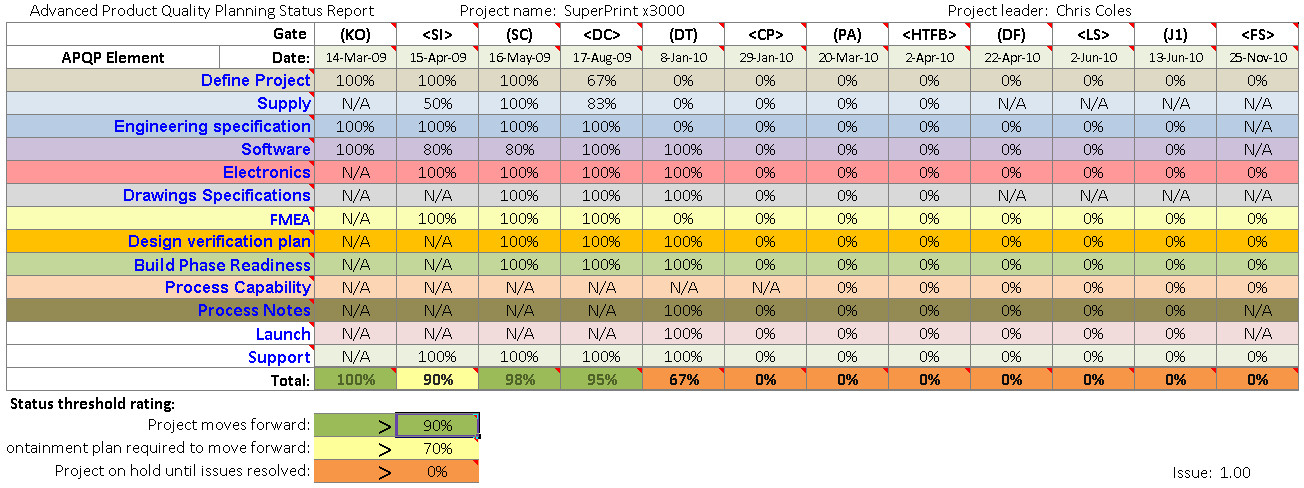
APQP provides a single ‘one sheet’ measure of project health for all stakeholders, making it a very portable and usable tool. Ideal for reporting project status up and down the supply chain and throughout your business. This ‘fact and data’ driven approach develops project buy-in from all key stakeholders.

APQP example sheet

Typical APQP workflow (product development)

Phase 1 — Plan and Define the Program

  • Identify design intent: life and quality goals.
  • Preliminary Bill of Materials (BOM).
  • Initial process defined.
  • Initial critical product and process characteristics.
  • Initial product assurance plan and signed-off management support statement.

Phase 2 — Product/Service Design and Development

  • Design/service Failure Mode Effects Analysis (FMEA).
  • Design for successful execution of the manufacturing, assembly of service path.
  • Design/service validation.
  • Preliminary control plans for early prototype/service trail phase.
  • Engineering documentation and proofs.
  • Engineering/service specifications.

Phase 3. Process/Service Design and Development

  • Process Failure Mode Effect Analysis (PFMEA).
  • Product/process quality system review.
  • System layout.
  • Characteristics matrix (CTQs).
  • Process/service flow chart.
  • Beta control plan prior to first run.
  • Packaging and delivery standards.
  • Process/service instructions.

Phase 4. Product/Process and Service System Validation

  • Trial runs.
  • Initial capability analysis.
  • Measurement Systems Analysis (MSA) and validation.
  • Production Part Approval Process (PPAP).
  • Production control plan.
  • Packaging validation: quality planning sign-off and management presentation.

Phase 5. Feedback, Assessment and Improvement Action

  • Reduce unwanted variation.
  • Confirm customer satisfaction or delight.
  • Delivery and service requirements have been met.

APQP allows your project teams to define specific goals and then check that they have been done correctly and at the right time. If for example the FMEA above had reported a major design problem, the APQP report is the place where this would be highlighted.

APQP makes your project team faster and more effective

APQP is an excellent project quality tool for both manufacturers and service providers. The APQP process is easily adaptable to almost any type of application or industry where effective and timely project management is needed.

Organizations interested in using APQP may consider using a professional APQP tool like APQP Tollgate Pro from Adaptive BMS:

APQP Template download

This highly customizable tool offers a simple and effective way to get started with APQP in your organization.

inLinkedIn ►YouTube vVimeo XX fFacebook
Contact us Privacy statement Security profile Media Terms of service Free corrective action software About us

Copyright © 2011-2026 Adaptive Business Management Systems Ltd. All rights reserved.

Registered number: 07617267. Registered office: Adaptive House, Fern Square, Weymouth, Dorset DT3 4NZ, United Kingdom.

Adaptive Business Management Systems Ltd. is a company registered in England and Wales.

Also known as: Adaptive, ABMS, Adaptive BMS, and adaptivebms.com